Advanced Telescope Supplies
Photometry
The amount of light that we receive from objects that are far removed from our home planet is called flux. The science of measuring the flux we receive from asteroids, comets, stars, nebulae, galaxies etc. is called photometry. Photometry usually refers to measurements of flux over a broad range of wavelengths of light. Measurement of flux, when coupled an estimate of the distance to an object, can give us information on the total energy output of the object (luminosity) from this we can apply physical laws to determine its temperature, size period of rotation and other physical properties.Because of the specialized and very expensive nature of the equipment necessary to measure the flux of an object, accurate photometry was the domain of professional astronomers until recently. The tool that has changed the status quo was the CCD camera. CCD cameras have some excellent properties:
- High Sensitivity
- Linear response
- Digital output
- Broad spectral response
- Relatively affordable
Apart from a CCD camera, to perform accurate photometry you an astrophotographic capable telescope. Various aspects of telescope design and performance can affect photometric data. For example, plain glass correcting plates used in many Schmidt Cassegrain Telescopes can severely limit observations at the UV end of the spectrum. For scientific grade studies you will also need a set of UBVRI photometry filters.
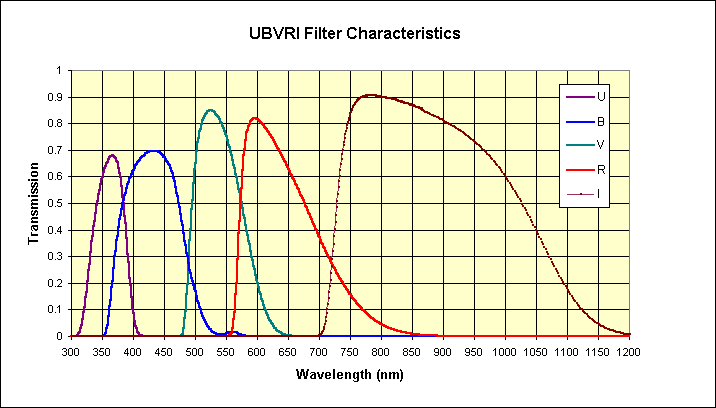
These are specifically designed isolate discreet frequencies of incoming starlight to very accurately measure its brightness. (Customers please note UBVRI filters take around 2-3 months to deliver).
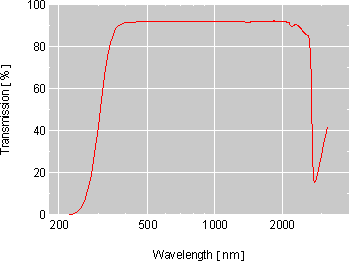
Transmission curve of Schott BK7 (3mm thick) Most CCD cameras use BK7 glass for their instrument windows, however for deeper UV studies quartz windows may need to be specified
Similarly, image aberrations can make it difficult to measure the flux of stars at the edge of a CCD field. Lastly you will need suitable software. We strongly recommend MIRA for PC's and compatibles as the tool of choice for photometry. It has a very comprehensive set of powerful photometry tools that are second to none in the PC world. Unix users will probably want to stick with IRAF
Back to homepage
Mira AP Astronomical Image Processing
MIRA AP 6 is the premier application
for processing astronomical images
on the PCMIRA AP provides all the tools most users need to process and analyze astronomical images from CCD's and digitized photographs. Attention to the mathematical aspects of image processing sets MIRA AP apart from other software. In spite of its advanced capabilities, MIRA AP has a remarkably short learning curve. And much more than just a "How to use" document, the MIRA AP User's Guide provides a wealth of information about rigorous, cutting edge techniques for processing astronomical images. Researchers, students, and amateur astronomers alike will find MIRA AP 6 a "must have" application for working with astronomical data on a PC.
F E A T U R E L I S T
Image Display
Single image display; Multiple image blinking and animation from 0 to >40
frames per second; Display modes: monochrome, psuedo-color, and RGB color.
Includes image printing and print preview with numerous image printing options
such as grid overlay, annotation, etc.; Real time contrast stretching and palette
manipulation. MIRA's image display and animation capabilities are unparalleled
on the Windows platform. See Image Display.
Palette
Management
Create and manipulate palettes using the MIRA Palette Manager . This provides
unparalleled ability to enhance images using pseudo-color and grayscale
adjustments. See Palettes.
Transfer Function
MIRA provides Linear , Logarithmic , and Gamma power transfer functions as
well as Histogram Equalization .
Dedicated Image
Cursor
Image windows have a dedicated cursor that displays pixel coordinates,
calibrated world coordinates, and pixel value at the mouse position. The cursor
also marks column and row bounds for plotting, and is used for centroiding and
setting bounds for ROI statistics and histograms. A real-time magnifier toolbar
tracks the cursor and shows a close-up view of the image centered on the cursor.
Toolbars
Real-Time Magnifier, Animation Control, Text Labeling, Astrometric Calibration,
Aperture Photometry, Bad Pixel Repair, and Image Registration.
Plotting Data
Plot individual columns and rows or the average over a range of columns or
rows; Plot all columns or rows within a rectangular region using Multi-plot and
Plot animation modes; Plot the Histogram of pixel values inside a rectangular
image region; Plot the Radial Brightness Profile and fit a Gaussian +
Constant function to estimate the Full Width at Half Maximum (FWHM), Peak
value, and background of the image. See Plotting Data and Radial Profiles.
Image Information
The image header can be viewed and edited using a FITS format headre editor. A
secondary tool is provided for viewing essential image information without FITS
format.
Arithmetic
Operations
Add, Subtract, Multiply, Divide, Blend images with a numeric value; Add,
Subtract, Multiply, Divide, and Blend images with other images; Change sign,
Byteswap, or compute the Base 10 logarithm, Square root, or Reciprocal of pixel
values.
Supported Data
Types
MIRA opens images and processes them using the following bit depths: 8, 16,
and 32 bit integer, 32 and 64 bit real, and 24 bit color. Images may also be
converted between types and mixed types may be combined in processing (e.g.,
flat field correct a 16 bit integer image using a 32 bit real flat field frame).
Contrast &
Brightness
Adjustments
Interactively change contrast, brightness and gamma value smoothly in real
time using mouse movements.
Coordinate
Measurement
Measure image coordinates to sub-pixel precision using MIRA's exceptional
centroiding algorithm.
CCD Bias Removal
Subtract the electronic bias signature from images using a bias value, reference
value, or a bias frame.
Dark Subtraction
Subtract dark frames directly, using exposure time scaling, or using dark noise
optimization.
Flat Field
Correction
Remove detector response variations using flat field frames.
Image Combining
Combine pixels from separate images to enhance S/N using the mean, median,
mode, and numerous other methods.
Image Registration
Remove image misalignments such as shift, rotation, and higher order
differences. You can even register images with non-square pixels, different
camera orientations, pixel sizes, and different optics. Any number of images may
be registered in a single setup. See Image Registration.
Astrometric
Calibration
Calibrate an image in celestial coordinates . This is a true astrometric
calibration using the 6 constant plate model. The coordinates are stored with the
image and used whenever the image is displayed again.
Cosmetic Defect
Repair
Create and apply bad pixel masks ; Repair bad pixel columns , rows , and
rectangles ; interactively Zap bad pixels and cosmic ray hits.
Aperture
Photometry
Measure any number of objects in an image using accurate automatic
background subtraction. Track object positions through a stack of images and
measure the entire set; Write Object lists to use with other images; Compute
aperture magnitudes using the only exact correction for partial pixel areas
available in any software available.
Image Annotation
Interactively add and edit text labels on images.
Geometric
Transformations
Affine Transformation (shift, rotate, and scale); Rotate about image center or a
point; Shift (horizontal and vertical); Re-orient (mirror flip horizontal and vertical,
rotate 90, rotate 180, rotate 270); Scale (different scaling in each axis; e.g., for
making pixels square); Expand (insert into a background of specified
brightness); Imbed (insert into another image); Wrap (similar to Shift but uses
unit pixel shifts with no re-sampling). The Affine, Rotate, Shift, and Scale
functions re-sample the image using bi-linear or superior bi-cubic kernels.
Sharpening Filters
Unsharp Mask and High Pass filters for general sharpening, Laplacian for
finding edges. The Unsharp Masking and High-Pass filters have adjustable
degree of sharpening. An optional Maximum Entropy module is also available
for ehnancing sharpness while supressing noise.
Image
Enhancement
MIRA AP 6 includes Digital Development Processing (DDP) for emulating the
response curve of photographic emulsion. An optional Maximum Entropy
module is also available for ehnancing sharpness while supressing noise.
Smoothing Filters
Boxcar (equal weight rectangle) for smoothing; Median for smoothing and for
removing isolated bad pixels. Both filters may have any width and height.
Miscellaneous
Filters
Custom 3x3 filter lets you design your own filter kernels; Rotational Gradient
for revealing detail in axially symmetric objects such as comets; Block Average
and Block Sum for software "binning".
Statistics
MIRA reports all the standard statistics for pixels in a rectangular image region.
For RGB color images, the statistics are reported for all channels. MIRA can also
plot the pixel value histogram of a rectangular image region.
Histograms
Compute the pixel value histogram of a rectangular image region of interest.
RGB Image
Support
Displaying, printing, merging channels, color balancing, extracting channels,
filters, statistics, centroid positions, image registration, animating, stacking,
filtering, and most other arithmetic functions. MIRA also opens and saves color
images in TIFF, JPEG, and BMP formats.
Image Formats
Standard Image Formats
Read and write images in FITS , TIFF , JPEG , BMP formats; Read unformatted
images in Binary and ASCII text formats.Camera Specific Formats
The following proprietary camera formats are supported: Photometrics,
Photometrics Star-1, SBIG (MIRA also writes to SBIG format), Celestron
(PixCel), Spectrasource Lynxx. Other CCD Cameras that save images in FITS
or TIFF format are implictly supported.
Plug-in Interface
MIRA 6 provides a Plug-in Interface for opening files in alien formats and for
performing custom processing and measurements on images. Plug-ins are
special DLL modules that are loaded by MIRA at start-up and appear as standard
program items inside MIRA. Plug-ins may be written by the user or acquired from
other authors.
File Plug-ins open images not in a format supported by the standard MIRA
application. A File Plug-in specifies a file filter that appears in the standard File |
Open dialog.
Math Plug-ins can process images or make measurements. Math Plug-ins
operate on a displayed image and are accessed from command names they
insert into the MIRA menu bar.
Printing
MIRA prints to black & white and color printers using the standard Windows
printer support. The following items may be printed: images, plots, centroid
results, statistics results, FITS header, photometry results, astrometry
results. All printable items have full print preview capability. Images and plots
have printing options such as print size and scale, grid overlay, user annotation,
etc. Overlays such as labels, markers, cursors, and apertures are also printed.
Expandability
Numerous options are available to extend MIRA AP's capabilities, including
add-on modules, Plug-ins, and a script language. Add-on modules provide
specialized capabilities such as spectroscopy, 3-d graphics, and more.
Camera Control
MIRA can also operate selected CCD cameras to create the ultimate acquisition
& processing application. See Camera Control for further information.
![]()
M I R A A P P R I C E L I S T
Due to $A to $US variations, please call or e-mail for the current price of Mira AP. Due to Mira's constant development and versions upgrades, we generally do not have copies in stock, but can deliver within 2 weeks of placing an order.S Y S T E M R E Q U I R E M E N T S
MIRA AP 6 is a 32 bit native "Win32" application for the Microsoft Windows 95, 98,
and NT 4.0 operating systems on PC compatible computers. MIRA AP requires
video hardware capable of 16-bit "high color" (65536 colors) or 24 bit "true color", and
at least 32 MB of RAM.